Cold email is broken.
At least, that's what most people think after they send out their first campaign and get a 2% open rate.
But here's the thing:
Cold email isn't broken. You're just using the wrong approach.
See, most people think cold email success comes down to writing the perfect subject line or finding the right opening hook. And while those things matter, they're missing the bigger picture.
The real secret to cold email success in 2026? It's all about the software. Cold email software is a great tool for simplifying your outreach and improving your results.
Here's what I mean:
It's important to understand the difference between cold email software and email marketing software.
Cold email software is specifically designed for 1:1 sales outreach to prospects, while email marketing software is used for bulk promotional campaigns to opt-in subscribers.
The best cold email tool automates the entire outreach process, allowing you to send personalized emails at scale. Automation features in cold email software can save you significant time by handling follow-ups and personalizations automatically.
The best cold email campaigns don't just rely on great copy. They use sophisticated tools that ensure emails actually reach the inbox, personalize messages at scale, and track everything that matters.
The difference is night and day.
Take deliverability, for example. Without proper email warming and domain authentication, even the most brilliant cold email will end up in spam. But with the right software handling these technical details automatically, you can achieve 90%+ inbox placement rates.
Or consider personalization. Manually researching and customizing emails for hundreds of prospects isn't realistic. But cold email software can pull data from LinkedIn, company websites, and social media to personalize every message in seconds.
Bottom line: The right cold email software doesn't just save you time. It multiplies your results.
And that's exactly what this guide is about.
I've tested dozens of cold email platforms over the past year. I've compared features, analyzed pricing, and tracked real campaign performance across different tools.
The result? This comprehensive breakdown of the 8 best cold email software options for 2026. If you're ready to improve your outreach, get started with one of these recommended tools today.
To save you time, I’ve put all of this info into a quick comparison table right below.
The right cold email tool can make outreach easier, faster, and more effective. However, not all tools offer the same features.
Here’s what really matters when picking one:
If your emails don’t reach the inbox, nothing else matters. Look for:
✅Warm-up features to boost sender reputation. Unlimited email warmup can help maintain sender reputation and improve primary inbox placement.
✅ Spam filters to prevent blacklisting.
✅ Domain reputation monitoring to track and fix issues before they hurt deliverability.
Features like primary inbox placement and managing multiple email accounts are crucial for ensuring your emails reach the intended recipients and avoid spam folders.
Generic emails get ignored. You need:
✅ AI-driven personalization to make emails sound natural and relevant, including generating personalized subject lines to improve engagement and response rates.
Personalization in cold emails can significantly improve engagement and response rates.
✅ AI variables and dynamic variables to insert prospect-specific details—such as names, company details, or recent activities—so your personalized messages feel more human-like and are more likely to bypass spam filters.
✅ Advanced tools now support personalized videos and images, allowing you to include multimedia personalization in your outreach and further increase engagement.
✅Custom sequences that adapt based on how the recipient interacts with your emails.
When choosing a cold email software, consider a cold outreach tool with strong multichannel outreach capabilities to maximize your results.
Cold outreach tools facilitate campaign creation and management across multiple channels, streamlining the setup and scaling of outbound campaigns through automation and integrations.
Cold outreach isn’t just about emails. The best tools let you:
✅ Schedule follow-ups automatically.
✅ Engage leads on multiple channels like LinkedIn, SMS, and calls. Strong multichannel outreach capabilities include integrating phone calls as part of the outreach workflow, allowing sales teams to connect with prospects through various touchpoints.
✅ Trigger next steps based on replies or clicks without manual effort. Some platforms allow you to use an event, such as a new lead or reply, to automatically update your CRM or initiate other actions.
✅ Achieve seamless automation by integrating workflows that automatically update your contact management system, reducing manual effort and saving time.
A strong contact list is just as important as the email itself. Accurate and up-to-date lead contact information is crucial for successful outreach. Look for:
✅ Built-in lead databases to find verified email addresses, with options to filter and segment leads by job title for more targeted outreach.
✅ CRM integrations to sync and track leads, leveraging real time data for the most current contact and behavioral information.
✅ Email verification tools with a built in email verifier, often offering free email verification, to ensure the accuracy and validity of email addresses. Using verified email addresses can help improve deliverability and reduce bounce rates in cold emailing.
Some cold email software can also identify and analyze website visitors to convert them into potential leads, and use accurate data through waterfall lead enrichment and validation processes to further enhance outreach success.
Sending emails blindly won’t help you improve. You need:
✅ Open and reply rate tracking to measure performance and monitor key metrics such as open rates, reply rates, and engagement for campaign optimization.
✅ A/B testing to find out what works best.
✅ Engagement insights—with advanced analytics, you get deeper insights into email performance, engagement metrics, and sales conversions to further refine your campaigns. Integrating Google Analytics can provide even more comprehensive data on campaign results.
✅ Conversion rate tracking to measure the effectiveness of your cold email campaigns and optimize for better results.
✅ Collaborative analytics and reporting so every team member can access and analyze performance data, making it easier to work together on improving outreach strategies.
Start small, but pick a tool that grows with you. Consider:
✅Free trials to test before committing.
✅ Affordable starter plans for solo users. Most cold email software offers a basic plan with limited features, and users can upgrade to paid plans for advanced functionalities like integrations, A/B testing, or AI capabilities. Some platforms also provide a forever free plan in addition to their paid plans, catering to different user needs.
✅ Scalability for teams that need multiple inboxes and integrations. The ability to invite unlimited team members is important for growing teams. Look for platforms that offer unlimited senders and unlimited email warmup—these features are essential for scaling outreach, managing multiple campaigns, and maintaining high deliverability as your team expands.
Now that you know what to look for, let’s compare the best cold email software in 2026. ⬇️
Here are the top cold email outreach software options for 2026:
Salesforge is a next-generation cold email and sales automation app designed to send unique, personalized emails at scale while maintaining high deliverability
This app streamlines cold email outreach by providing advanced features and integrations for efficient sales and marketing processes.
Unlike traditional outreach tools, it programmatically creates messages based on AI-driven insights, ensuring emails don’t feel robotic or repetitive. With AI assistance, Salesforge can help users build complete email sequences, saving time and ensuring targeted messaging for sales or marketing campaigns.
Here’s what makes Salesforge different
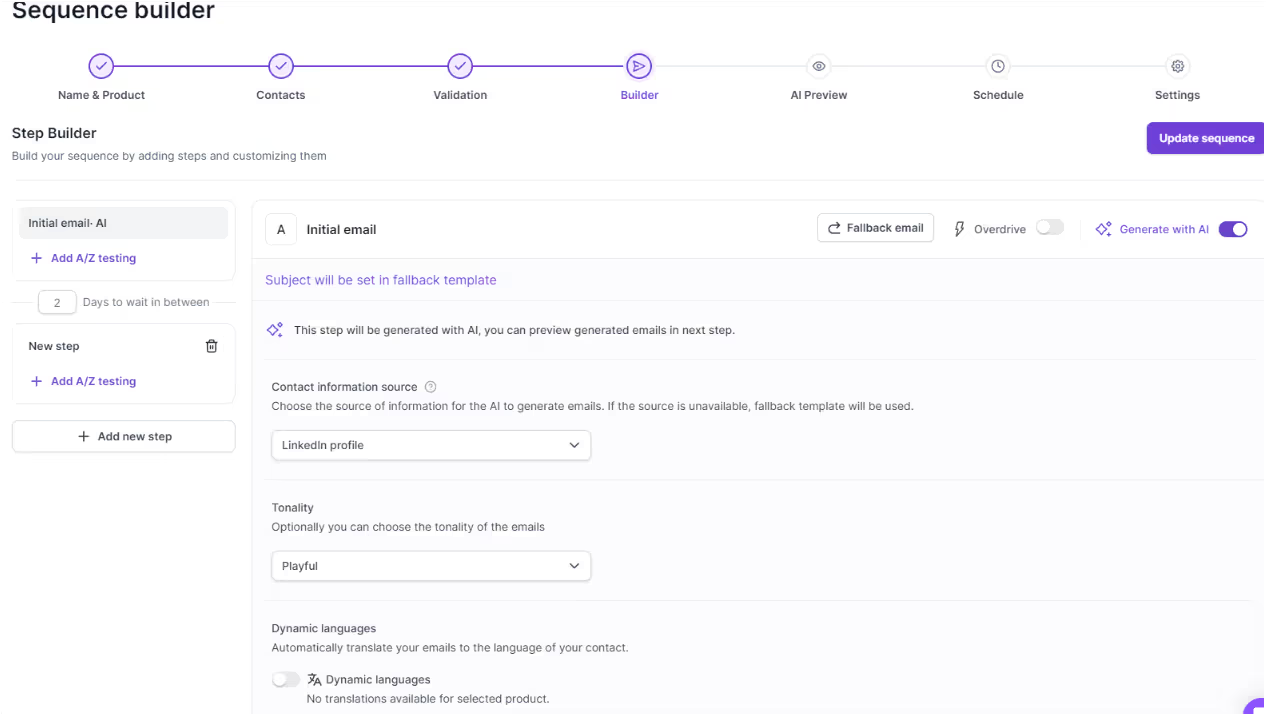
✅ AI-Powered Email Personalization – Unique emails for every recipient, crafted in any language. Salesforge uses AI variables to dynamically insert prospect-specific details, enabling scalable and natural-feeling personalization.
✅ Advanced Deliverability – Built-in warm-up, domain reputation monitoring, and inbox rotation for premium email deliverability. Salesforge also features dynamic ESP matching, which automatically pairs campaigns with the most suitable email service providers to optimize deliverability and inbox placement.
✅ Automated Lead Management – Integrated tools for email validation, data enrichment, and CRM syncing. Salesforge ensures accurate data through waterfall lead enrichment and validation processes, so your outreach is based on reliable contact information. Salesforge lets users automate workflows and efficiently manage multiple campaigns from a single dashboard.
✅ Multi-Channel Outreach – Send emails, schedule LinkedIn touchpoints, and manage follow-ups from one place.
✅ AI Agents Like ‘Agent Frank’ – Automate outreach without losing human-like quality.
Salesforge is perfect for:
Whether you're a solo founder or a large enterprise, Salesforge grows with you.
✔ AI-Powered Personalization – Unique, human-like messages at scale.
✔ Superior Deliverability – Built-in warm-up, DKIM, SPF, and domain monitoring.
✔ Multi-Language Support – Send emails in 20+ languages effortlessly.
✔ CRM & API Integrations – Works with your existing sales stack.
✔ Multi-Channel Outreach – Email + LinkedIn automation + AI agents.
❌ No Built-in Lead Database – Unlike Apollo, you need to import your own leads.
❌ Pricing Can Add Up – While the base plan is affordable, scaling AI Agents costs extra.
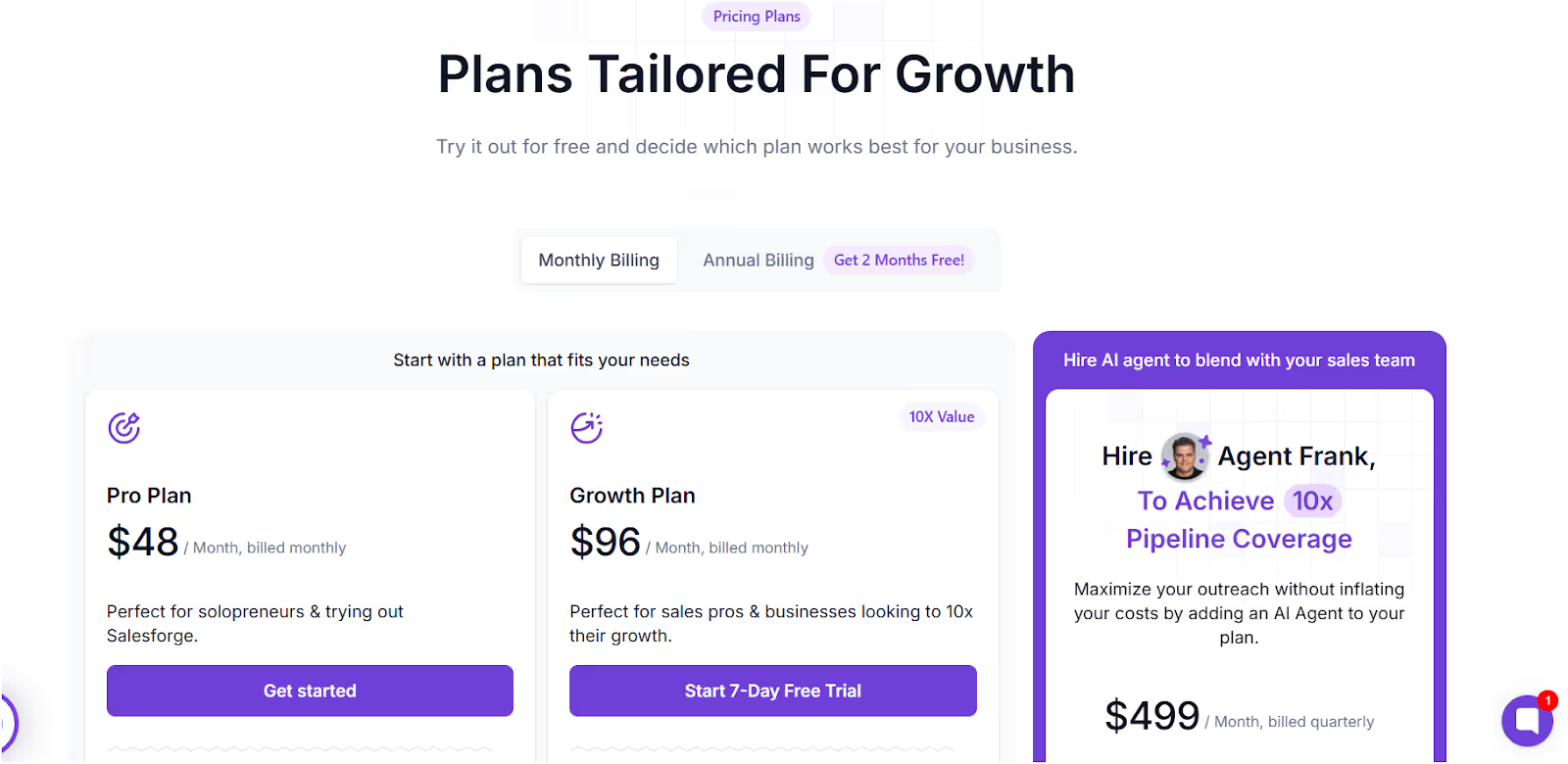
Salesforge offers two plans: human-powered plans for manual outreach and AI-driven automation with “Agent Frank.” Salesforge displays its prices openly, while some competitors require you to request a demo or contact sales to see prices.
✅ Free Trial Available
✅ Unlimited Mailboxes & Workspaces in all plans
✅ API & CRM Integrations in Growth & AI Plans
If you need a cold email tool that combines automation, AI, and deliverability, Salesforge is a top-tier choice
It's more advanced than traditional tools like Lemlist or Mailshake and focuses on sending high-quality emails that land in the inbox. Salesforge helps drive engagement and sales growth by leveraging advanced automation and personalization features.
👉 It is Best for: Sales teams, agencies, and anyone serious about high-performing cold email campaigns. 👉It is Not ideal for: Beginners who just need a basic email sender.
If you want to scale outreach without burning your sender reputation, Salesforge is one of the most powerful cold email tools in 2026. Its warmup and deliverability features help users build a positive sender reputation, ensuring your emails avoid spam folders and reach your prospects' inboxes.
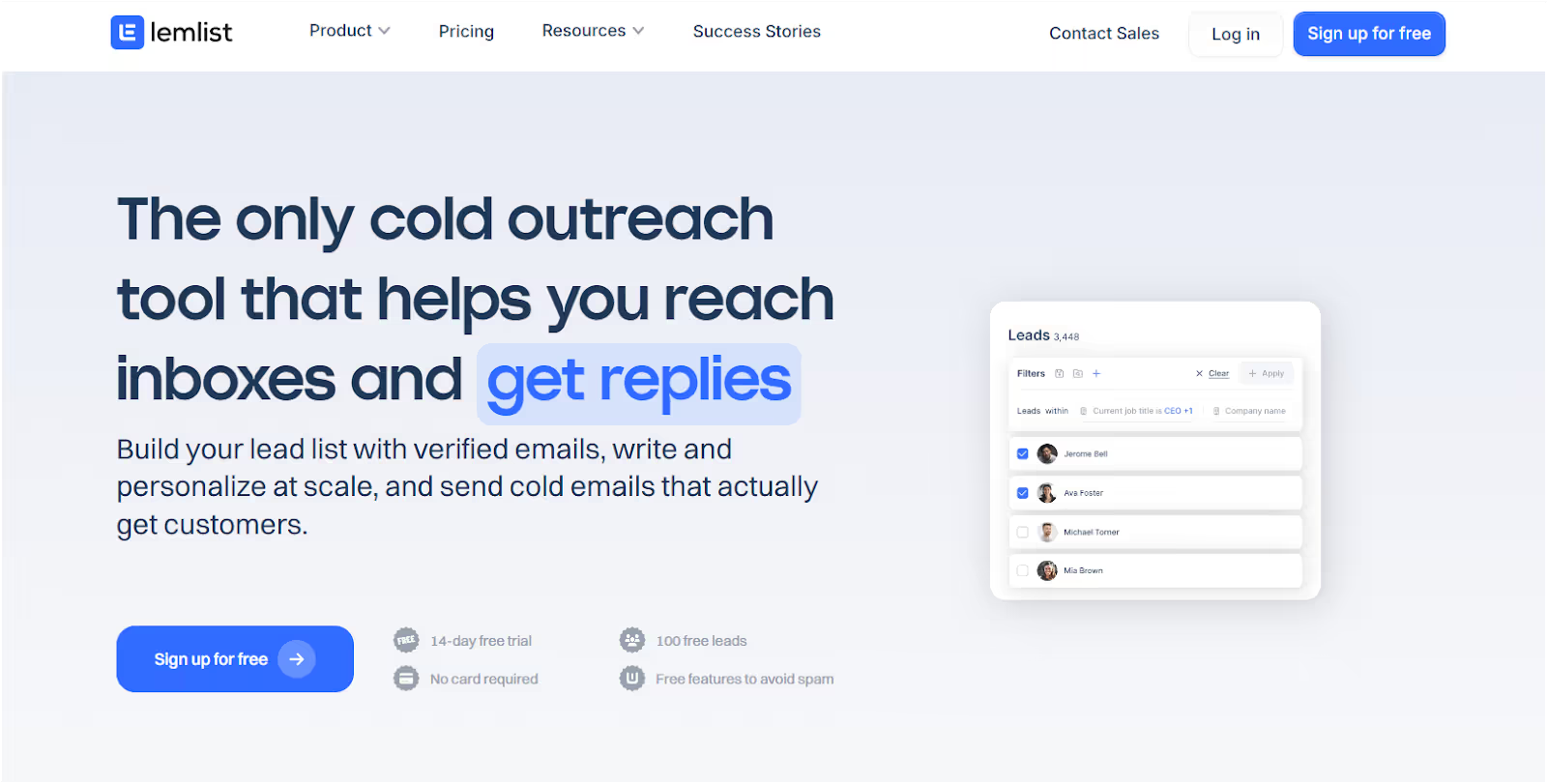
Lemlist is a cold outreach and multichannel sales automation tool designed to help businesses send personalized emails, automate LinkedIn outreach—including automated connection requests—and make cold calls—all from one platform.
Lemlist also offers a Chrome extension for managing cold email campaigns and pulling lead information directly from the browser, making it easy to integrate with Gmail and other platforms.
It’s well-known for image and personalized video personalization, making outreach feel more human.
Lemlist supports advanced multichannel outreach, but note that this option is not available on the cheapest plan.
One common case where Lemlist excels is automating outreach for SaaS companies looking to scale their prospecting efforts efficiently.
If your goal is to create highly customized cold emails at scale, Lemlist might be a strong contender.

But does it meet all the key criteria for a great cold email tool? Let’s get in.
Lemlist helps sales teams, agencies, and recruiters automate and personalize their email outreach campaigns for better results:
✅ Find leads from a 450M+ B2B contact database.
✅ Send hyper-personalized emails with custom images, GIFs, and videos.
✅ Automate LinkedIn & cold call sequences alongside email outreach.
✅ Streamline campaign creation with intuitive tools that make it easy to set up, manage, and scale outbound campaigns.
✅ Act as a comprehensive cold outreach tool by integrating multichannel outreach—including LinkedIn, calls, SMS, and WhatsApp—into a single platform for seamless prospect engagement.
✅ Integrate with a variety of apps such as CRMs, lead databases, and marketing tools to streamline outreach workflows.
✅ Boost email deliverability with built-in warm-up and inbox rotation.
✅ Track and optimize campaigns with A/B testing, engagement analytics, and AI-driven insights.
It’s more than just an email sender—Lemlist aims to make every outreach feel personalized while automating the process.
Lemlist works best for:
Lemlist offers features allowing users to automate and personalize their outreach campaigns, making it suitable for a wide range of professionals.
It's great for personalization-focused outreach but may not be ideal for those needing deep automation or AI-driven messaging.

✔ Custom Visual Personalization – Add personalized images, GIFs, and videos to make outreach feel human.
✔ Multichannel Outreach – Automate email, LinkedIn, and cold calls in one sequence.
✔ Email Warm-Up Included – Helps improve deliverability and inbox placement.
✔ A/B Testing & Analytics – Optimize subject lines, messaging, and outreach strategy.
✔ Pre-built Campaign Templates – Speed up outreach setup with tested workflows.
❌ Limited AI-Driven Personalization – While Lemlist offers visual personalization (images, GIFs, and videos), it lacks AI-generated message writing like Salesforge.
❌ Clunky UI & Learning Curve – Some users report difficult navigation and non-intuitive workflows.
❌ Customer Support Issues – Reports of slow response times and strict refund policies.
❌ Bugs & Performance Problems – Some users experience frequent downtime, delays in sending emails, and system glitches.
❌ Email Tracking Inconsistencies – Open and click tracking may count your own clicks, leading to inaccurate reporting.
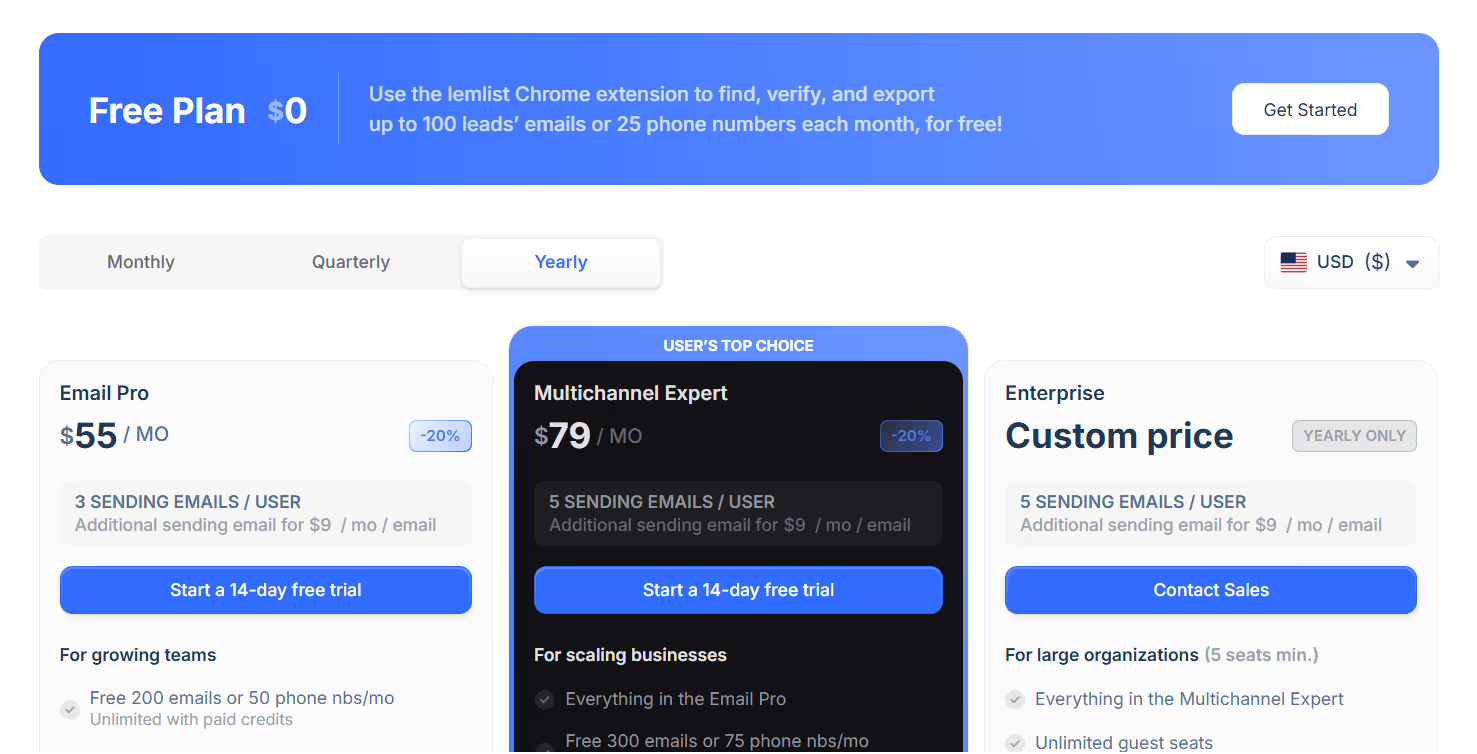
Lemlist offers three pricing tiers, including a free plan with limited features.
✅ 14-Day Free Trial Available
✅ Lead Database Access – 450M+ contacts (limited free credits included)
✅ CRM Integrations – HubSpot, Salesforce, Pipedrive
If your top priority is personalization, Lemlist is one of the best options available.
It's great for adding a human touch to cold outreach with images, videos, and LinkedIn integration. Lemlist offers unique features compared to other email outreach tools, particularly in visual personalization, allowing users to stand out with customized images and videos.
👉 It is Best for: Sales teams, agencies, and marketers who want to combine personalization with automation.
👉 It is Not ideal for: Businesses looking for AI-driven email generation or those needing highly stable automation.
If you want hyper-personalized outreach across email, LinkedIn, and cold calls, Lemlist is a strong choice.
However, if you need AI-powered automation and a more stable platform, you may want to consider alternatives like Salesforge.


Instantly is a cold email platform designed for businesses that want to scale cold email campaigns with unlimited email accounts, unlimited senders, unlimited email warmup, AI-powered optimizations, and lead-finding tools.
As an all-in-one solution, Instantly integrates lead finding, outreach, and campaign management in a single platform. Instantly.ai allows unlimited sending accounts for scaling outreach and includes email warm-up features to maintain high deliverability.
Instantly ensures accurate data and real time data for effective outreach, using waterfall lead enrichment and validation processes to provide reliable, up-to-date contact information that improves targeting and engagement.
It’s known for its automation capabilities, including the ability to use an event—such as a new lead or reply—to trigger actions like updating contacts in HubSpot or other CRMs, streamlining contact management and improving marketing efficiency. Its cost-effective pricing makes it popular among startups, agencies, and freelancers.
But does it deliver on its promises? Let’s break it down.
Instantly is an AI-powered sales engagement platform that helps businesses:
✅ Send cold emails at scale with unlimited email accounts.
✅ Connect more accounts to facilitate larger outreach campaigns, making it easy to scale your efforts.
✅ Streamline campaign creation with intuitive tools that simplify the setup, management, and scaling of outbound email campaigns.
✅ Act as a comprehensive cold outreach tool by integrating multichannel outreach features, enabling automation across platforms like LinkedIn, calls, SMS, and WhatsApp for improved prospect engagement.
✅ Improve deliverability with automated warm-up features, including unlimited email warm up to continuously improve sender reputation.
✅ Find leads using built-in data enrichment and lead discovery.
✅ Manage conversations across inboxes with Unibox.
✅ Optimize campaigns using AI-driven analytics and A/B testing.
✅ Trigger automated actions using events—for example, when a new lead or reply event occurs, Instantly can update CRM records or initiate follow-up workflows.
It’s a scalable solution for outreach but comes with some trade-offs when it comes to stability and customer support.
Instantly is best for:
It's great for volume-based outreach but may not be ideal for highly personalized campaigns.
✔ Unlimited email accounts – Unlike most tools, Instantly doesn’t charge per mailbox.
✔ Built-in lead finder – Helps discover and verify contacts.
✔ AI-powered campaign optimization – Improves subject lines, send times, and engagement rates.
✔ Affordable pricing – Lower cost compared to competitors like Salesforge or Lemlist.
✔ Unibox for centralized inbox management – Easily track and respond to prospects.

❌ Deliverability issues over time – Some users report emails landing in spam despite warm-up.
❌ Inconsistent campaign execution – Reports of emails not sending on time or sequences breaking.
❌ Lead finder data accuracy – Some users found contact details outdated or missing.
❌ Poor customer support – Complaints of slow responses and lack of refunds.
❌ Bugs & performance issues – Users report campaign delays, email tracking glitches, and UI crashes.

Instantly offers four pricing tiers, with all plans including unlimited email accountsemail warm-up.
Each plan is designed to support sending emails to thousands of prospects, making Instantly suitable for large-scale outreach campaigns.
✅ Free trial available
✅ API & integrations – Webhooks, CRM sync, and custom workflows
If scaling cold email outreach at a low cost is your main priority, Instantly is a solid option.
It's one of the most affordable tools for volume-based outreach, with unlimited email accounts and automation features.
👉 It is Best for: Agencies, freelancers, and startups looking to send high-volume outreach campaigns at scale. 👉 It is Not ideal for: Businesses needing high deliverability, AI-driven personalization, or LinkedIn & multichannel outreach.
Great for cost-effective bulk outreach, but be aware of potential deliverability and support issues.
If email placement and advanced personalization matter more, tools like Salesforge or Lemlist might be better options.

Apollo.io is an end-to-end sales intelligence and engagement platform that combines B2B contact data, automated outbound, and deal management into one tool.
It’s designed to help businesses find, contact, and close leads faster with AI-powered insights and automation.
Apollo.io supports multi-channel sequences via email, LinkedIn, and calls, and its sales engagement plans include a certain number of dialer minutes, allowing sales teams to make calls directly from the platform as part of their outreach.
The platform streamlines campaign creation for outbound sequences and enables users to filter prospects by job title for highly targeted outreach.
Apollo.io also ensures accurate data and real time data through advanced lead enrichment and validation processes, providing up-to-date and reliable contact information for effective prospecting.
New users may experience a learning curve when onboarding with Apollo.io and may require support to master its features.
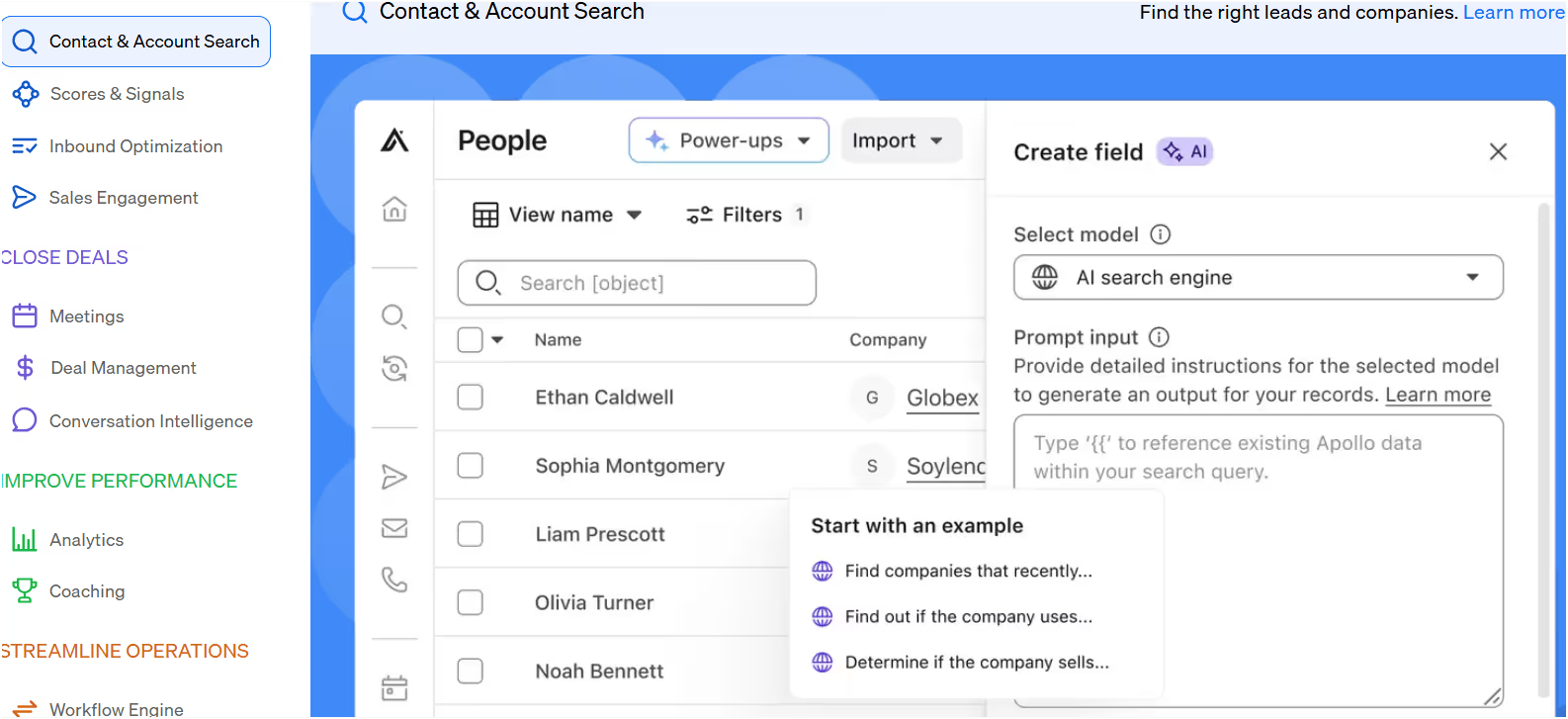
Let’s get into who should use Apollo, its key strengths, limitations, and pricing to see if it’s the right fit for your sales team.
Apollo.io is a go-to-market (GTM) platform that helps sales teams:
✅ Find leads – Access a database of 210M+ contacts and 35M+ companies.
✅ Contact-ready information – Get pre-verified, reliable leads that are immediately usable for outreach.
✅ Automate outreach – Send multi-channel sequences via email, LinkedIn, and calls.
✅ Dialer capabilities with included minutes – Certain plans provide a set number of dialer minutes, allowing users to make outbound sales calls as part of their campaigns.
✅ Improve conversions – Track engagement, analyze conversations, and optimize sales processes.
✅ Enrich CRM data – Keep contact and company records up to date automatically.
✅ AI-driven recommendations – Use buying signals and lead scoring to target high-intent prospects.
It's positioned as a cheaper alternative to ZoomInfo, with integrated outreach and deal tracking.
Apollo is ideal for:
It's great for sales prospecting at scale but not the best for deep personalization.
✔ Massive B2B database – 210M+ contacts and 35M+ companies.
✔ Integrated sales engagement – Combine email, LinkedIn, and call outreach in one tool.
✔ Advanced filtering & intent signals – Helps identify high-quality leads.
✔ CRM enrichment – Automatically updates contact and company records.
✔ Affordable pricing – Significantly cheaper than ZoomInfo while offering similar features.

❌ Inconsistent data quality – Some users report high bounce rates and outdated contacts.
❌ Email deliverability issues – Emails sometimes land in spam despite verification.
❌ Slow customer support – Users complain of long response times and lack of refunds.
❌ Overcomplicated UI – Feature-packed but not always intuitive for beginners.
❌ Hidden limits – “Unlimited” email access actually caps at 10K exports.


Apollo offers four pricing tiers, with a free plan for basic prospecting.
✅ Free plan available
✅ AI-powered research & insights included in higher plans
✅ Cheaper alternative to ZoomInfo with built-in sales engagement
If you need a cost-effective alternative to ZoomInfo with built-in sales automation, Apollo.io is a strong option.
It's best for teams looking to combine prospecting, outreach, and deal tracking in one platform.
👉 It is Best for: Sales teams, startups, and revenue operations looking for lead generation and outbound automation at a lower cost.
👉 It is Not ideal for: Businesses needing 100% verified data or advanced AI personalization.
Apollo.io is a solid all-in-one sales intelligence tool, but data accuracy and deliverability can be hit-or-miss. Users should be aware of the risk of data quality or deliverability issues, as these potential downsides may impact campaign results.

Mailshake is a cold email automation tool designed to help sales teams, marketers, and agencies streamline their campaign creation, email outreach, follow-ups, and lead engagement.
It acts as a comprehensive cold outreach tool, enabling users to manage and scale outbound campaigns through automation infrastructure and integrations.
While Mailshake is focused on cold email outreach, it differs from traditional email marketing tools that are designed for bulk campaigns to opt-in subscribers.
Mailshake allows users to build custom email sequences tailored to their outreach goals. Automation features include multi-step automated follow-up sequences for managing prospect interactions.
In addition to multi-channel outreach and phone dialing, Mailshake’s Sales Engagement plan includes unlimited dialer minutes for calls within the US and Canada, providing significant value for teams engaging in cold calling. Mailshake can also automate connection requests as part of its multi-channel outreach, especially when integrating with platforms like LinkedIn.
It’s a great option for those looking for an easy-to-use, no-frills platform with built-in automation, A/B testing, and deliverability tools. For smaller campaigns, GMass is a browser-based tool that works within Gmail and may be a suitable alternative.
But is Mailshake the right tool for your business?
Let’s explore who should use it, its strengths, weaknesses, and pricing to help you decide.
Mailshake is a sales engagement tool focused on email outreach.
It allows users to:
✅ Automate cold email sequences – Send emails and follow-ups on autopilot.
✅ Pause email sequences automatically – Sequences can be paused when a recipient books a meeting or takes a desired action, preventing unnecessary follow-ups.
✅ Optimize deliverability – Includes email warmup, verification, and throttling to improve inbox placement.
✅ Enhance personalization – AI-powered writing assistant (SHAKEspeare) and A/B testing for better responses. Mailshake supports personalized messages to tailor outreach for each prospect, and advanced plans allow users to include personalized videos for even higher engagement.
✅ Integrate with CRMs & third-party tools – Works with Salesforce, HubSpot, Pipedrive, and Zapier.
✅ Multi-channel outreach – Supports LinkedIn automation and phone dialing for deeper engagement. Mailshake also integrates with the Gmail inbox, allowing users to manage and automate outreach directly from their email platform.
✅ Unlimited dialer minutes – The Sales Engagement plan offers unlimited dialer minutes for phone outreach, so users can make as many calls as needed within supported regions.
Mailshake is best for small teams & solopreneurs who need a simple, affordable cold email tool with basic automation.
Mailshake is ideal for:
However, it’s not the best fit for large enterprises needing complex workflows, multi-touch automation, or AI-driven personalization.
✔ Simple & easy to use – Clean UI, minimal learning curve.
✔ Built-in email deliverability tools – Includes email warmup, verification, and rotation.
✔ Affordable pricing – Cheaper than competitors like Outreach.io or Apollo.io.
✔ Multi-channel engagement – Supports LinkedIn automation & phone dialer.
✔ CRM integrations – Works with Salesforce, HubSpot, Pipedrive, and more.

❌ Limited automation – Doesn’t support advanced triggers, conditional logic, or AI-powered sequences.
❌ Basic AI personalization – SHAKEspeare helps write emails but lacks deep personalization options.
❌ Buggy features – Some users report campaign breaks, inaccurate lead scoring, and missing follow-ups.
❌ Poor customer support – Many complaints about slow responses & lack of troubleshooting.

❌ No free trial – You have to pay upfront to use the tool.

Mailshake offers three pricing tiers, each billed annually:
✅ Affordable compared to tools like Outreach.io & Apollo.io
❌ No free trial – Requires upfront payment
Let's dive into Mailshake's features and see how it compares to other cold email tools.
If you're looking for a simple, cost-effective cold email tool, Mailshake is a solid choice. It's easy to use, offers great deliverability features, and supports multi-channel outreach.
👉 It is Best for: Small businesses, startups, and sales teams needing a straightforward email outreach tool with automation.
👉 It is Not ideal for: Enterprises or teams needing advanced automation, deep AI personalization, or complex multi-step workflows.
Mailshake is great for basic cold email outreach but falls short on automation and personalization compared to competitors like Salesforge or Apollo.io.

Snov.io is an all-in-one sales engagement platform and one of several cold outreach tools designed to help businesses automate and scale their outreach.
Snov.io streamlines campaign creation, allowing users to easily set up, manage, and scale outbound email campaigns with automation and integrations across multiple channels.
These specialized platforms focus on features like automation, personalization, deliverability, free email verification, and integration with email accounts, making them essential for optimizing email marketing campaigns and improving deliverability by reducing bounce rates.
Its automation features are focused on saving users time and streamlining outreach processes. Snov.io acts as a comprehensive cold outreach tool, supporting multichannel outreach—including LinkedIn automation—and offering free email verification as part of its deliverability suite.
With a range of tools like email finder, verifier, drip campaigns, and LinkedIn automation, Snov.io is tailored for startups, small businesses, and freelancers looking to scale their sales efforts without breaking the bank. It is best for teams wanting a straightforward sequence builder, drip campaigns with automated follow-ups, and AI writing in one platform.
But is Snov.io the right tool for you?
Let’s see who should use it, its strengths, weaknesses, and pricing to make an informed decision.
Snov.io is a sales automation tool offering a suite of features to streamline lead generation and outreach, including:
✅ Email Finder & Verifier – Locate and verify email addresses for effective outreach.
✅ Drip Campaigns – Automate follow-ups with personalized email sequences.
✅ LinkedIn Automation – Combine LinkedIn and email touchpoints for multi-channel engagement.
✅ Email Warm-up – Improve email deliverability to ensure messages reach the inbox.
✅ Sales CRM – Manage and track your sales pipeline with a built-in CRM.
✅ Job Title Filtering – Filter and segment leads by job title to target specific decision-makers and personalize your cold email campaigns for higher response rates.
Snov.io is best suited for small teams and solo entrepreneurs who need affordable sales automation tools with basic CRM features.
Snov.io is ideal for:
However, it’s not recommended for larger enterprises needing advanced features, robust integrations, or intricate automation workflows.
✔ Affordable pricing – Budget-friendly plans suitable for small businesses.
✔ Comprehensive feature set – Includes email finder, verifier, CRM, and LinkedIn automation.
✔ Good email deliverability tools – Offers email warm-up and verification.
✔ Easy-to-use interface – Minimal learning curve for beginners.
✔ Extensive integrations – Works with HubSpot, Pipedrive, Zapier, and more.

❌ Data quality issues – Users report low accuracy in email verification and lead data.
❌ Limited automation – Basic automation features compared to competitors like Apollo.io or Lemlist.
❌ Inconsistent customer support – Complaints about slow responses and unhelpful support.
❌ Billing issues – Reports of overbilling and difficulties in payment processing.
❌ User interface glitches – Some users find the UI clunky and buggy, affecting usability.

Snov.io offers flexible pricing plans to accommodate different needs:
✅ Budget-friendly – Suitable for small businesses and startups.
❌ Billing complaints – Users report issues with payment processing and credit rollovers.
If you're looking for a cost-effective solution to generate leads, automate email outreach, and manage your sales pipeline, Snov.io is a viable option
👉 It is Best for: Freelancers, startups, and small businesses needing affordable sales engagement tools with basic automation.
👉 It is Not ideal for: Enterprises or teams requiring advanced features, high-quality data, or robust automation capabilities.
Snov.io offers a solid set of tools for beginners and budget-conscious users but falls short in data accuracy, advanced automation, and customer support compared to higher-end Snov.io competitors like Apollo.io or Salesforge.

Woodpecker.co is a cold email software and automation platform designed to maximize email deliverability, personalize outreach, and automate follow-ups.
It streamlines campaign creation and serves as a comprehensive cold outreach tool, supporting multichannel outreach and automation.
Woodpecker offers free email verification as part of its deliverability features, helping verify email addresses to reduce bounce rates and improve campaign effectiveness. Tools like Woodpecker and Instantly also help prevent emails from hitting spam folders through warm-up features.
It is praised for its ease of use and clean interface, making it suitable for users looking for condition-based campaigns. However, its pricing plans can be complicated due to additional fees for features.
It also helps maintain organized and accurate contact lists for effective outreach.
It focuses on ensuring emails reach the inbox and not the spam folder, making it a strong choice for sales teams, agencies, and lead generation experts.
But does Woodpecker live up to its promise? Let’s see.
Woodpecker.co is a sales automation tool that helps businesses automate cold email outreach, validate email addresses, and warm up inboxes to avoid spam filters.
Key Features:
✅ Cold Email Automation – Create multi-step email sequences with follow-ups.
✅ Deliverability Tools – Includes email warm-up, verification, and inbox rotation to prevent emails from landing in spam.
✅ Personalization & AI Assistance – Supports AI email writing, spintax (custom variations), and conditional follow-ups.
✅ Lead Segmentation by Job Title – Filter and segment leads by job title to target specific decision-makers and personalize outreach for higher response rates.
✅ Agency Panel – Allows agencies to manage multiple client campaigns.
✅ CRM & Integrations – Works with HubSpot, Pipedrive, Zapier, Google Sheets, and more.
Woodpecker.co is ideal for teams who need a cold email tool with strong deliverability protection and automation capabilities.
Woodpecker is great for:
However, it's not the best choice for businesses needing multi-channel outreach (LinkedIn, calls, social) or advanced automation workflows.
✔ Strong focus on email deliverability – Free warm-up, email verification, and inbox rotation.
✔ Easy-to-use – Simple UI and quick campaign setup.
✔ Highly personalized outreach – Dynamic variables, spintax, and condition-based sending.
✔ Agency-friendly features – Manage multiple accounts and clients in one dashboard.
✔ Affordable pricing – Competitive pricing compared to other cold email platforms.

❌ Email deliverability issues reported – Some users experience low open and reply rates despite warm-up features.
❌ Slow customer support – Multiple complaints about poor response times and lack of refunds.
❌ Limited integrations – Fewer native CRM and sales tool integrations compared to Apollo.io or Lemlist.
❌ No multi-channel automation – Lacks LinkedIn automation and direct calling features.
❌ Technical setup challenges – Connecting Outlook and DNS settings can be difficult.

Woodpecker offers five pricing tiers, making it accessible for different business sizes.
✅ Cost-effective for small businesses and agencies.
❌ Scaling up gets expensive – Higher plans can be pricier than alternatives like Salesforge or Instantly.ai.
If you need a cold email tool focused on deliverability, personalization, and automation, Woodpecker.co is a solid choice.
👉 It is Best for: Sales teams, agencies, and SMBs looking for affordable cold email automation with strong deliverability protection.
👉 It is Not ideal for: Businesses needing multi-channel outreach (LinkedIn, calls), deep CRM integrations, or highly scalable enterprise solutions.
Woodpecker.co excels in email deliverability and personalization but falls short in integrations, multi-channel outreach, and customer support responsiveness.
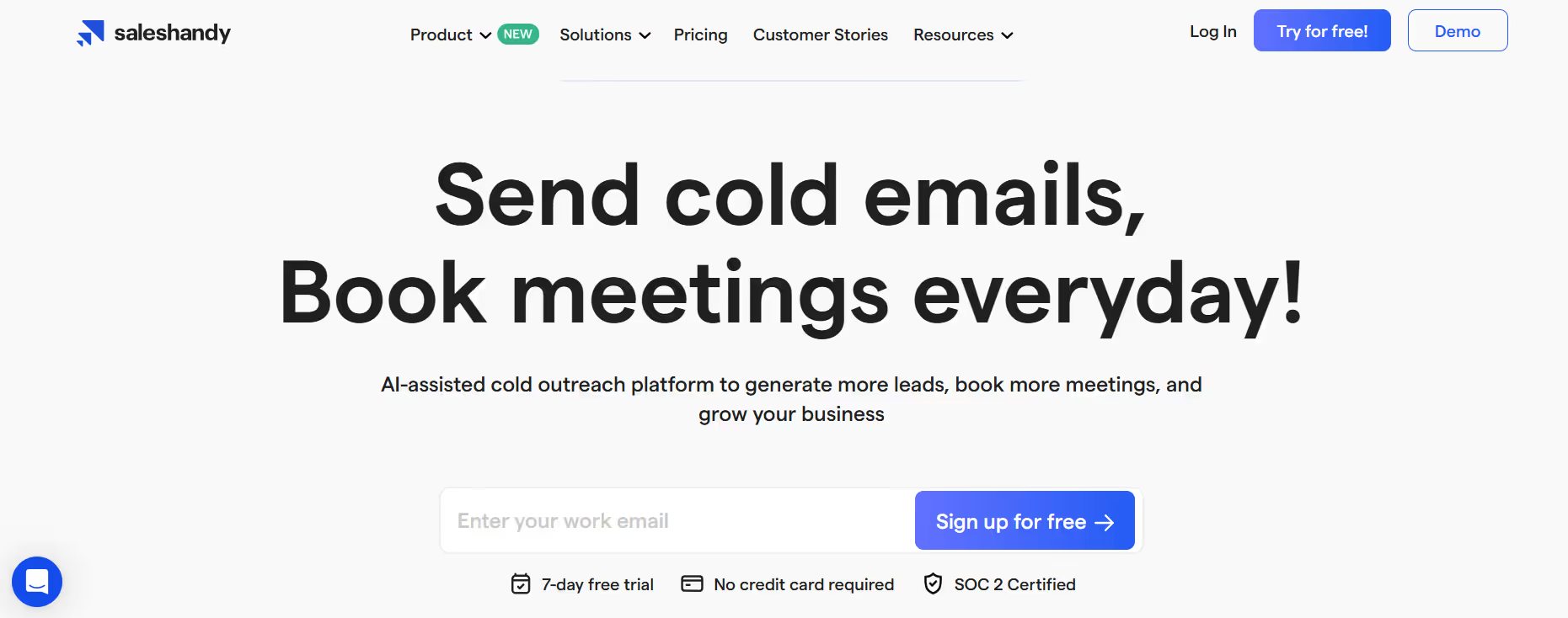
Saleshandy is an AI-powered B2B cold email tool that helps businesses send personalized emails, reach more leads, and improve email deliverability.
It streamlines campaign creation and acts as a comprehensive cold outreach tool by automating and scaling cold email campaigns, making it easier to book meetings and close deals.
Saleshandy offers unlimited senders and unlimited email warmup, allowing you to scale your outreach while maintaining high deliverability and sender reputation.
It’s a great choice for lead generation agencies, sales teams, entrepreneurs, and anyone looking to grow their business through cold emailing.
Its easy-to-use interface and advanced deliverability make Saleshandy a favorite among professionals to run strong outbound campaigns. It also provides integration with popular CRMs like Zoho, Hubspot, Pipedrive, and Salesforce.
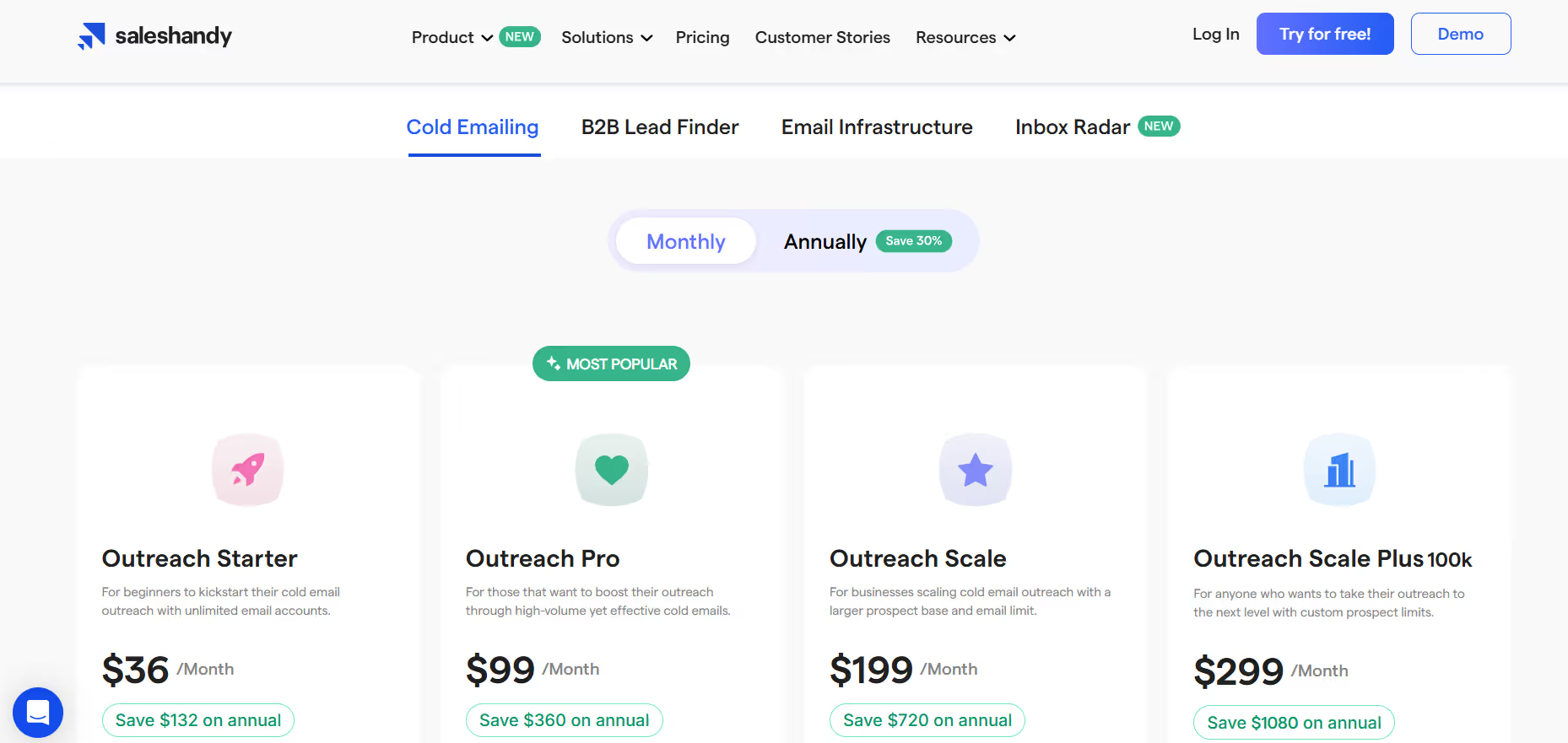
✅ Budget-friendly- Suitable for small businesses and startups.
❌ Short trial Period- The trial period is limited to 7 days.
If you're looking for a scalable, personalization-focused cold email tool, Saleshandy is a strong contender. It offers advanced automation, smart follow-ups, and excellent deliverability features making it popular among agencies, startups, and growing sales teams.
👉 It is Best for: Agencies, startups, and sales teams that need to scale cold outreach with personalization, automation, and reliable deliverability.
👉 It is not ideal for: Beginners who only need very simple campaigns, or enterprises seeking a full multi-channel sales engagement platform.
Saleshandy is excellent for personalized cold email outreach at scale, but may not be the right choice if you need multi-channel automation or deep sales intelligence like Apollo.io or Salesforge.
Here’s the problem with most “best of” lists:
They tell you about features. But they don’t tell you how to actually choose.
That’s what this section is about.
Because the “best” cold email software isn’t the one with the most features. It’s the one that fits your specific business needs, budget, and growth plans. While there are many other cold email software and other cold email tools available, it’s important to compare them based on deliverability, multichannel outreach, lead database access, and overall efficiency.
Some tools may lack key functionalities that your business requires, so consider these differences when evaluating your options.
Additionally, keep in mind that cold emails must comply with regulations such as the CAN-SPAM Act in the United States. To ensure compliance, always include an unsubscribe option for recipients in your cold email campaigns.
Let me walk you through exactly what to look for:
First things first: not all features are created equal.
Some are must-haves. Others are nice-to-haves that you’ll probably never use.
Here’s what actually matters:
Personalization: Look for cold email software that supports advanced personalization features like AI variables, which dynamically insert prospect-specific details to make your outreach feel more natural and human-like. Some tools also offer personalized videos, allowing you to embed multimedia content tailored to each recipient, significantly boosting engagement and response rates.
Deliverability: Prioritize platforms with features like dynamic ESP matching, which automatically pairs your campaigns with the most suitable email service providers in real-time. This optimizes inbox placement and improves overall deliverability.
Sequence management: Make sure the software allows you to set up automated follow-ups and manage multi-step campaigns efficiently.
If your emails don't reach the inbox, nothing else matters. Look for these non-negotiables:
Without these, you're basically throwing money away.
Generic emails get deleted. Personalized emails get replies.
But here's the catch: most "personalization" features are just fancy mail merge. Look for:
Cold email is rarely about one message. You need follow-up sequences that feel natural:
They focus on the monthly fee instead of the cost per result.
A $50/month tool that generates 10 qualified leads is infinitely better than a $200/month tool that generates 5.
Your business is going to grow. Your cold email software should grow with it.
Volume Handling: As your outreach scales, look for cold email software that supports unlimited senders and offers unlimited email warmup. These features are crucial for managing multiple email accounts, maintaining high deliverability, and ensuring your campaigns can expand without restrictions.
Team Collaboration: Choose a platform that allows you to add team members for collaborative campaign management. This enables each team member to analyze performance, handle outreach, and contribute to the success of your cold email campaigns through shared analytics and reporting.
Infrastructure Scaling: Make sure the software can handle increased data, contacts, and campaign complexity as your business grows.
Can the platform handle your growth without breaking the bank?
As you add salespeople, you need features that keep everyone aligned:
Technical stuff that matters more as you grow:
If you're planning to send more than 1,000 emails per month or add team members, scalability isn't optional.
Automation is what separates amateur cold email from professional outbound sales.
Modern cold outreach tools streamline campaign creation and management, allowing users to easily set up, automate, and scale their outbound efforts across multiple channels.
But not all automation is helpful. Some just adds complexity.
Here's something most people don't think about until it's too late:
When your email campaigns aren't working, you need help fast.
Pro Tip: Test their support during your trial period. Ask a technical question and see how helpful their response is. That's exactly the experience you'll get as a paying customer.
The bottom line: Choose cold email software like you'd choose any business partner. Look beyond the features and focus on how well it fits your specific needs, budget, and growth plans.
Because the best tool is the one you'll actually use to drive results.
After testing dozens of cold email platforms, analyzing features, and tracking real campaign performance, there's one clear winner:
Salesforge.
Here's why:
It's Not Just Software—It's a Complete Ecosystem
While other tools focus on one piece of the puzzle, Salesforge gives you everything you need for successful cold outreach:
That's not just convenient. It's game-changing.
Most businesses spend months piecing together different tools, dealing with integration headaches, and trying to make everything work together. With Salesforge, you get a unified system that just works.
Ready to Transform Your Cold Outreach?
If you're serious about building a predictable pipeline through cold email, there's really only one choice.
Start your Salesforge free trial today and see the difference a complete cold email ecosystem makes for your business.
.png)

.png)
.png)

